This guide covers the complete process of deploying an Oxide rack — from pre-installation planning through final acceptance testing. The Phase 1 checklist sections below consolidate all preparation requirements into a single reference so nothing is missed before installation day.
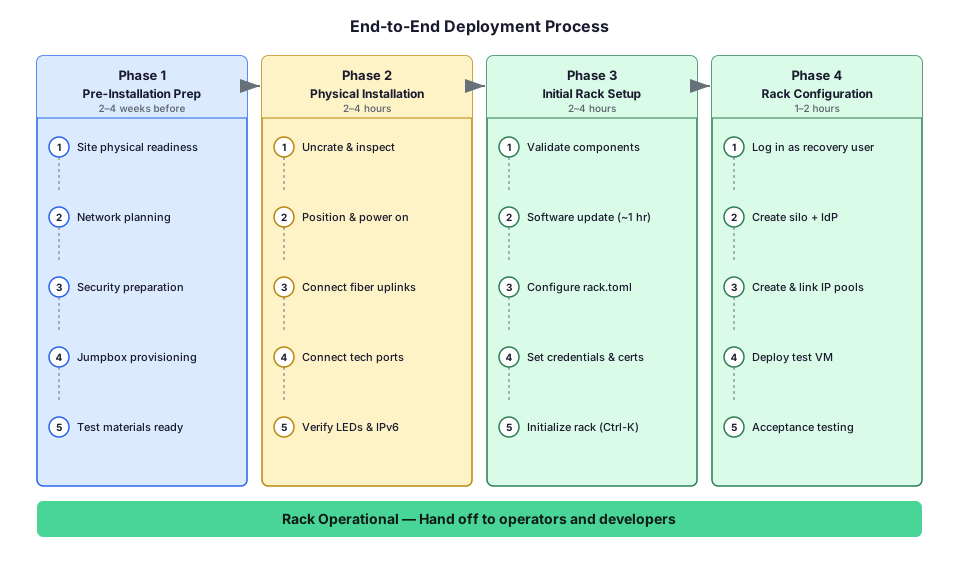
Deployment process overview
Deploying an Oxide rack involves phases that begin weeks before the rack arrives on-site. Phases 0 and 1 can proceed in parallel.
| Phase | What Happens | Typical Duration | Who’s Involved |
|---|---|---|---|
0. Facilities Preparation | Site readiness, power planning, delivery path verification | 4–6 weeks before install | Facilities, Datacenter operations teams |
1. Network and Operations Prep | Jumpbox setup, network planning, credential preparation | 2–4 weeks before install | Network, Security |
2a. Physical Installation | Uncrate, position, and inspect rack | 1–2 hours | Facilities team |
2b. Power Connection | Connect power whips and validate power delivery | 1 hour | Electrical team |
2c. Network Connectivity | Connect uplink fiber and technician ports | 1–2 hours | Network team |
3. Initial Rack Setup | Software update, wicket configuration, rack initialization | 2–4 hours | Oxide Support Engineer, Network Engineer (on standby) |
4. Rack Configuration | Silo creation, IdP integration, IP pools, acceptance test | 1–2 hours | Operators |
The Phase 1 checklist sections below cover pre-installation preparation. Phases 2–4 are covered in the Rack Installation, Initial Rack Setup, and Rack Configuration guides.
Phase 0: Facilities preparation
Datacenter operations and facilities teams prepare the physical site. This work can proceed in parallel with Phase 1.
Facilities Overview — Introduction to facilities requirements, installation day timeline, and coordination with network and operations teams.
Site Requirements — Delivery path verification, datacenter environment specifications, floor space and clearance requirements.
Power Connection — Redundancy configurations, power drop specifications, connector types, and validation procedures.
Phase 1: Network and operations preparation
Network, security, operations, and rack operators prepare integration requirements. Work through each section below in order — items in earlier sections are prerequisites for later ones.
A. Site and facilities requirements
Before proceeding with network and software planning, first ensure that all physical infrastructure requirements are met. The Facilities Preparation Guide provides complete details for datacenter operations teams and facilities managers.
Validation Steps:
Datacenter space prepared (see Site Requirements)
Power drops installed and active (see Power Connection)
Delivery path verified for crated rack dimensions (102" H × 59" W, 2,694 lbs)
Environmental specifications met (35–95°F, 8–80% RH)
Power configuration determined with desired redundancy appropriate drops
Power connector type confirmed (L22-20P, CS8365C, or IEC 60309)
Power configuration questionnaire
Work with your facilities team or colocation provider to answer the following questions about your power outlets. These details are required when ordering the rack to ensure the correct power whip connectors are installed.
1. How is 3-phase power delivered at each outlet the system will plug into?
Wye (3-phase + Neutral + Ground / 5-wire)
Delta (3-phase + Ground / 4-wire)
2. Is a neutral conductor present at each outlet?
Yes (confirms Wye configuration)
No (confirms Delta configuration)
3. What is the outlet type?
NEMA L22-20R (20A twist-lock, typically Wye)
Hubbell CS8369 (50A "California Style", typically Delta)
IEC 60309 (pin & sleeve)
If using the IEC 60309 standard, confirm:
Clock position:
6 o’clock (Wye) or
9 o’clock (Delta)
Color:
Red (Wye) or
Blue (Delta)
4. What is the current rating of each outlet?
20A
32A
50A
60A
63A
5. What is the line-to-line (phase-to-phase) voltage at the outlet?
208V L-L (common in 120/208V wye systems in North America)
240V L-L (Hi-Leg Delta systems)
400V L-L (common in 230/400V wye systems)
415V L-L (common in 240/415V wye systems, Europe)
480V L-L (480V wye systems)
B. Jumpbox and remote access
Jumpbox requirements
| Requirement | Details |
|---|---|
Operating system | Unix-based (Linux, BSD, Solaris, etc.) with OpenSSH client and server installed. |
SSH access | Oxide staff can SSH directly to the jumpbox (over VPN if configured), with support for |
Storage | 100 GB or more free disk space — used as a staging area for software images and for copying logs/crash dumps from the rack with customer consent. |
Physical connections | Two RJ45 Ethernet connections to the rack — one to any technician port on each switch. |
Network connectivity
The jumpbox must connect to two networks:
VPN or corporate network — allows Oxide staff to SSH into the jumpbox from an external connection.
Direct attachment to the technician port VLAN — enables IPv6 link-local addressing, router advertisements, and IPv6 multicast traffic for rack discovery and access.
User accounts
Customer provides Oxide with one or more user accounts on the jumpbox.
SSH access is controlled and granted by the customer.
No phone-home feature or background process automatically exports data outside the rack.
Remote support access pattern
When remote support is needed, the access flow works as follows:
Oxide requests access from customer.
Customer grants access credentials/token (e.g., VPN credentials).
Oxide staff SSH into the jumpbox.
Oxide staff SSH from jumpbox to rack via technician port, using forwarded token-backed Oxide support keys.
Upon completion, customer terminates the access.
C. Network planning
Complete the Network Preparations guide, then verify that the following items are ready:
Physical network
Optical transceiver type selected from supported list.
Fiber cables ready for uplink connections (2 minimum, 4 for full redundancy).
Uplink ports on upstream switches configured with MTU ≥ 1500 (≥ 9000 to support jumbo frames).
Management network (technician ports)
At least 2 to 4 RJ45 Ethernet cables ready, with at least one connection per Oxide switch.
Jumpbox or laptop able to perform IPv6 autoconfiguration (SLAAC).
Technician ports isolated from each other - if connected to same upstream switch, they must be on separate VLANs (e.g., TP1 on VLAN 100, TP2 on VLAN 200). Failure to isolate causes race conditions and initialization failures.
Firewall allows TCP port 22 (SSH) to the technician port network.
Broader network services
Gather the following values — you will enter them during Initial Rack Setup:
| Item | Value | Notes |
|---|---|---|
Upstream DNS server IPs (max 3) | ___ | Must be recursive resolvers; specified as IP addresses |
NTP server addresses (max 3) | ___ | May be DNS names or IP addresses |
Delegated DNS domain | ___ | e.g., |
IP address ranges
Plan and allocate the following IP address ranges before installation day. Ranges do not need to be contiguous and can be expanded later.
Services IP Pool (used by Oxide infrastructure):
Allocate a minimum of 13 addresses (20 recommended). See IP Address Planning in the Network Preparations guide for the full breakdown by component.
Instance IP Pool (used by virtual machines):
See Create and Configure IP Pool for sizing guidance. You can start with a small range and expand dynamically after setup.
Infrastructure IPs (assigned to switch uplink ports):
You will need one IP address per uplink port configured. For a typical 2-uplink setup, allocate 2 addresses plus a gateway on each subnet.
Data network routing
The Oxide Rack supports either static routing and BGP, but not both. Choose one routing strategy:
Static routes — simpler setup, suitable for single-gateway topologies.
BGP — dynamic routing, suitable for multi-path or complex topologies.
If using BGP, see BGP Configuration Planning in the Network Preparations guide for required parameters and constraints.
Switch port configurations
For each uplink (minimum 2, one per switch), fill in the following:
| Switch / Port | Uplink IP / CIDR | Gateway or BGP Peer Address |
|---|---|---|
Switch 0, qsfp__ | ___ | ___ |
Switch 1, qsfp__ | ___ | ___ |
Switch 0, qsfp__ (optional) | ___ | ___ |
Switch 1, qsfp__ (optional) | ___ | ___ |
Firewall considerations
Review what ACL changes are required in your corporate firewall to allow traffic between the IP pools defined on the Oxide rack and external hosts. See Data Network Firewall Ports in the Network Preparations guide for the full list of required ports.
D. Identity provider integration
If you plan to use SAML-based SSO for rack user authentication, prepare the following. See the Identity Providers guide for detailed integration examples with specific providers.
Silo configuration
| Attribute | Description | Your Value |
|---|---|---|
Silo name | Used in the silo endpoint URL (e.g., | ___ |
IdP name | Short name for the provider, which users will see in the login URL path. | ___ |
SP client ID | The IdP application/client identifier. | ___ |
ACS URL |
| (auto-generated) |
SLO URL | Single logout endpoint — this can be same as ACS URL. | ___ |
Technical contact email | IdP support contact (specified by the operator). | ___ |
Entity ID / Issuer | IdP client root URL or SAML issuer ID. | ___ |
Group attribute name | SAML attribute listing the user’s groups. | ___ |
Silo admin group | IdP group to be granted the silo admin role. | ___ |
Metadata source | Base64-encoded XML or accessible URL for SAML descriptor. | ___ |
E. TLS certificate and credentials
TLS certificate
Generate a TLS certificate for the delegated domain before installation day. You will upload it during Initial Rack Setup.
A recommended approach would be to generate a wildcard certificate with a DNS SAN of
*.sys.$domain. For example, if your delegated domain is cloud.acme.com, the
certificate SAN should come out to be *.sys.cloud.acme.com.
CN=*.cloud.acme.com covers only first-level subdomains and
cannot be used for $silo.sys.cloud.acme.com endpoints. The wildcard must be at the
\*.sys.cloud.acme.com level.See Upload TLS Certificate for format requirements, validation steps, and common errors.
Recovery password
A password vault or management service has been identified to safekeep the recovery password.
The recovery password has been chosen (you will enter it interactively during rack setup; it is never transmitted in plaintext over the network).
BGP authentication key
If your upstream BGP peers require MD5 authentication, prepare the authentication key in advance.
BGP MD5 authentication key obtained from your network team or upstream provider.
Key format verified: plain text string (not a hash or encoded value).
Key stored securely in your password vault for entry during rack setup.
What you’ll need: The same MD5 authentication key configured on your upstream BGP peer routers. You will enter this key in the rack.toml configuration file during Initial Rack Setup.
Key format: Plain ASCII string, typically 10-80 characters. The key must match exactly on both sides (case-sensitive).
F. Acceptance testing preparation
After rack initialization, you will want to verify the system is working by deploying a test VM.
A Unix-based OS image in RAW or ISO format ready for upload (if you have qcow2 images, convert with
qemu-img convert -f qcow2 -O raw input.qcow2 output.raw).An SSH key pair for VM provisioning.
G. Optional pre-installation steps
Download the Oxide CLI
If you prefer CLI over the Web Console for rack configuration, download the binary ahead of time:
You can also prepare request payloads based on the examples in the Rack Configuration guide.
Pre-stage DNS delegation
If you can configure DNS delegation ahead of time, set up NS records for your delegated domain pointing to the Oxide external DNS server IPs you’ve allocated. This can be validated immediately after rack initialization.
Summary checklist
Use this checklist to verify that all prerequisites have been met before installation day:
Physical & Power (see Facilities Guide for details)
Delivery path clear for crated dimensions (102" H × 59" W, 2,694 lbs) — Site Requirements
Datacenter environment meets specs (35–95°F, 8–80% RH) — Site Requirements
Power configuration determined with desired redundancy — Power Connection
Power drops installed and active (2 minimum, 4 recommended) — Power Connection
Power whip connector type confirmed (IEC 60309, CS8365C, or Wieland GST18i3) — Power Connection
Rack placement with 2-tile clearance front and back — Site Requirements
Jumpbox / Access
Jumpbox provisioned with Unix OS, OpenSSH, 100GB+ storage.
Jumpbox connected to both VPN and technician port VLAN.
User accounts created for Oxide staff.
Network
Transceivers procured and compatible.
Technician port cables ready (min 2 RJ45).
Technician ports on separate VLANs (isolated from each other).
IPv6 SLAAC enabled on technician port interfaces.
Upstream DNS server IPs identified (recursive resolvers).
NTP server addresses identified.
DNS domain delegated.
Services IP pool allocated (minimum 13, recommended 20 addresses).
Instance IP pool sized and allocated.
Infrastructure IPs for switch uplinks allocated.
Routing strategy chosen (static or BGP) and parameters documented.
Firewall rules configured.
Identity & Security
IdP application configured with SAML attributes.
TLS certificate generated for
*.sys.<domain>with full chain.Recovery password chosen and vault identified.
BGP auth key ready (if applicable).
Acceptance Testing
Linux VM image in RAW or ISO format.
SSH key pair ready.
Installation day (hours 0-8)
On installation day, work proceeds sequentially with clear handoffs between teams:
Phase 2a: Physical installation (hours 0-2)
Facilities team uncrates, positions, and inspects the rack.
Physical Installation — Uncrating procedures, rack positioning, securing the rack, and preliminary product inspection.
Phase 2b: Power connection (hours 2-3)
Electrical team connects power and validates power delivery.
Power Connection — Connecting power whips, energizing the rack, LED validation, and handoff to network team.
Phase 2c: Network connectivity (hours 3-5)
Network team connects uplink fiber and technician ports.
Rack Installation — Fiber uplink connection, technician port setup, and IPv6 connectivity verification.
Phase 3: Initial rack setup (hours 5-9)
Oxide Support and network engineer configure and initialize the rack via wicket.
Initial Rack Setup — Component validation, software updates, rack.toml configuration (DNS, NTP, IP ranges, routing), credential setup, and rack initialization.
Phase 4: Rack configuration (hours 9-11)
Operators complete final configuration and acceptance testing.
Rack Configuration — Recovery silo login, user silo creation, identity provider integration, IP pool setup, and post-configuration validation with acceptance testing.